September 22, 2025
Updated on
August 25, 2026
Usability Testing: The Practical Guide to Methods, Process, and KPIs
Usability testing involves observing real users performing real tasks with your product to uncover usability issues before they become costly. Because you observe people using it, this method is the most reliable way to determine if a product is truly usable.



Table of contents
This guide explains what usability testing is, why it's worthwhile, what methods are available, how many testers you need, how a test is conducted, and how to measure usability. For each detailed question, you'll find an in-depth article at the relevant point: on costs, methods, testers, tasks, tools, KPIs, the distinction between UX audit and usability test, and the ROI of UX. This way, you get an overview and can dive deeper into what matters most to you right now.
Key takeaways
• Usability testing means: real users from your target audience perform real tasks with your product while you observe where they encounter difficulties.
• It measures behavior, not opinions, and uncovers problems that surveys and internal assessments overlook.
• The most severe problems often become apparent with just a few users. However, how reliable this is depends on the context (more on this in the chapter on testers).
• The biggest lever is iteration: it's better to test small multiple times, correct, and retest than to do one large test.
• This guide functions as a hub. Each detailed question has its own linked in-depth article.
What does Usability Testing achieve?
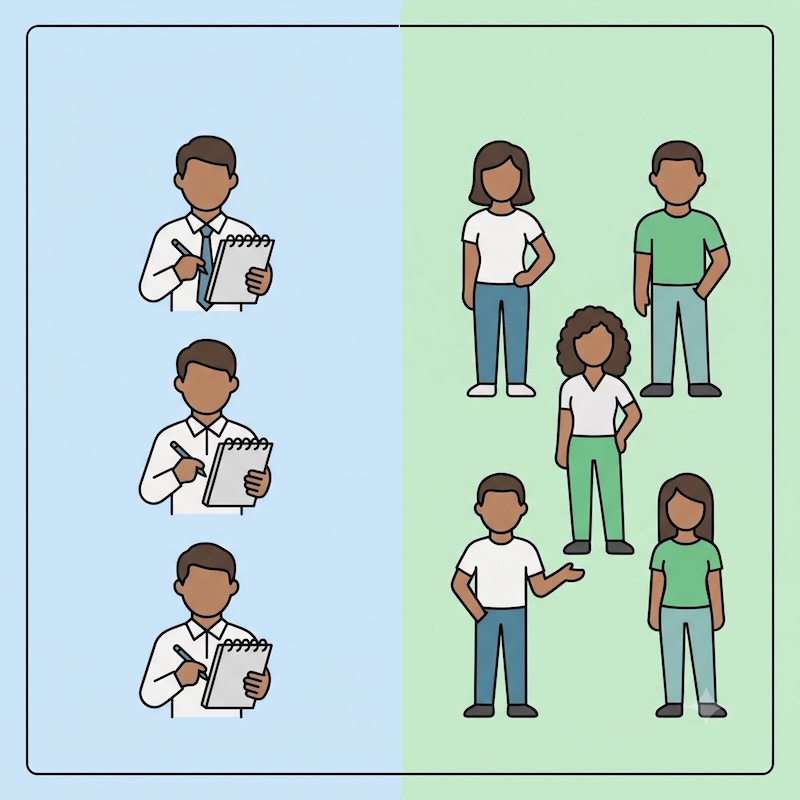
Usability testing verifies whether people can successfully use your product by observing them in action. You give real users a realistic task and watch where they hesitate, click, get lost, or give up. The crucial point: you observe behavior instead of listening to opinions.
This clearly distinguishes usability testing from related terms.
User research is the umbrella term for all methods you use to understand users. Usability testing is one of them. Also part of user research are surveys and market research, where statements are collected about what people do or want. What they actually do when they are in front of your user interface is often something else.
Usability testing also differs from expert methods. In a heuristic evaluation and a UX audit, experts assess your product based on established principles, without speaking to real users. Usability testing, however, involves real users. Both approaches complement each other well but answer different questions. Our UX Audit Guide shows what a comprehensive audit offers in addition.
→ Read more: Difference between UX Audit and Usability Test
→ Read more: Nielsen's Heuristic Evaluation
Practically anything digital can be tested: a website, a web app, a mobile app, an interactive prototype, or a complete SaaS product. So you don't have to wait for the finished product, as a clickable prototype is often enough to identify the most important issues early on. If you want to combine testing and problem-solving, you'll find both in the Design Sprint.
Why Usability Testing Pays Off
Early tests save significant money later. A usability issue discovered on a prototype costs a design change. Fixing the same problem after launch costs development time, a new release cycle, and in the worst case, lost customers. The difference is between a small tweak and an expensive overhaul.
The business impact extends beyond saved development costs. Products that users can operate without frustration tend to lead to higher conversion rates, better adoption, and fewer support requests. In B2B sales cycles, there's an often underestimated advantage: if you can demonstrate that your product has been tested and is demonstrably user-friendly, you have a strong argument in stakeholder discussions.
→ Learn more: The ROI of UX
At brightside, we test with real users from the respective target group, because the question is never whether the team understands the product, but whether the person who ultimately pays for it does. It is precisely this external perspective that an internal team, due to its daily proximity to the product, finds difficult to adopt.
What types of usability tests are there?
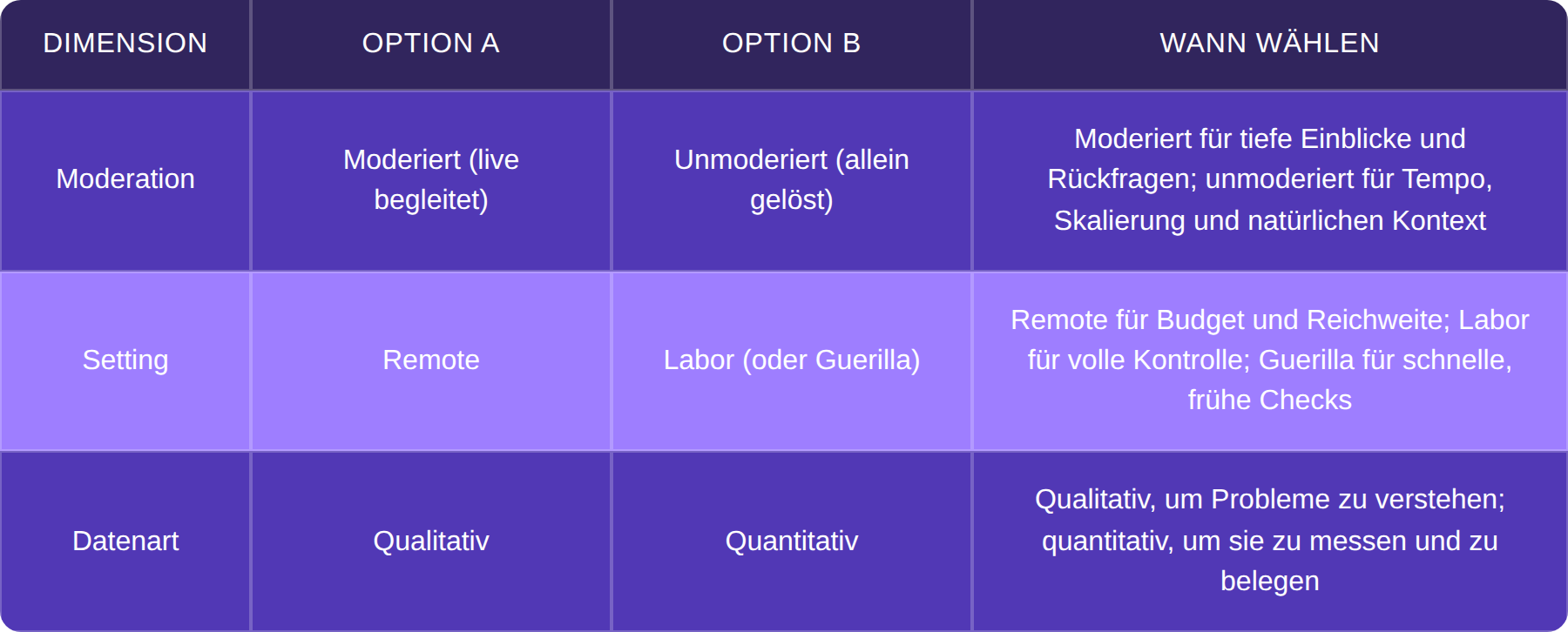
Usability tests differ along three axes, and the combination you choose depends on your question. The first axis is moderated versus unmoderated: In moderated tests, you observe the user live and can ask questions; in unmoderated tests, users complete tasks alone, usually via a tool, and you evaluate the recordings later.
The second axis is remote versus lab (with guerrilla testing as a quick, informal variant). Remote is cost-effective and location-independent, while a lab offers more control. The third axis is qualitative versus quantitative: Qualitative tests show you why users fail; quantitative tests tell you what percentage of users complete a task.
As a rule of thumb: Moderated and qualitative tests answer the question "Why do users fail?" Unmoderated and quantitative tests answer the question "How many complete task X?"
→ In detail: all usability testing methods in detail.
How many test participants do you really need?
For qualitative tests, a few users per target group are often sufficient, as the most significant problems emerge early and repeatedly. The best-known rule of thumb comes from Jakob Nielsen and the Nielsen Norman Group: A study with around five participants typically uncovers about 85% of usability problems.
This 5-user rule is an excellent starting point, but not a guaranteed value. While it uncovers the most severe and common problems, the reliability of a single set of five users varies depending on the product, target group, and tasks. For very diverse user groups or complex applications, you will need more participants. The in-depth article clarifies exactly when.
More important than the exact number is iteration. A good approach: start with five people, find the biggest problems, fix them, and then test again with another five people. Three rounds with five users each will yield more than a single test with fifteen, because you can make corrections in between and directly verify those corrections.
→ In detail: How many test participants you really need.
It's not about the numbers, but the right people: Five users from your actual target audience are more valuable than twenty random participants. We can help you recruit suitable test participants if you don't have access to your target group.
Transforming tasks into realistic scenarios
Well-designed tasks are the difference between a test that uncovers real problems and one that merely confirms what you want to hear. It's helpful to distinguish three elements: A scenario provides the realistic context ("You are planning a business trip to Berlin"), a task is the specific action ("Find and book suitable accommodation"), and questions gather attitudes and impressions before or after.
A few 'don'ts' will help you avoid skewed results. Don't ask leading questions that pre-empt the answer. Avoid using UI terms like "Click the blue button in the top right" – that reveals the solution and defeats the purpose of the test. Instead, frame scenarios from the user's perspective, not using your internal feature names.
→ In detail: Writing Tasks – 25 Examples and a Template, including a downloadable template to get you started right away.
Which Tools for Usability Testing?
The right tools depend on your objectives, but they can generally be categorized into three types. For unmoderated remote and prototype tests, there are platforms where users complete tasks independently, and you can analyze the recordings. For recruitment, panel providers can connect you with suitable test participants. And for quantitative insights, analytics tools like heatmaps and session recordings offer supplementary behavioral data. In the DACH region, it's always important to consider GDPR compliance, which we cover in detail in our tool article.
→ In detail: the right usability testing tools.
If you want to demonstrate usability to stakeholders, you need numbers. Three metrics will take you a long way: The Task Success Rate shows what percentage of users complete a task. Time on Task measures how long it takes them to do so. And the System Usability Scale (SUS) uses ten standard questions to assess perceived usability on a scale from 0 to 100.
When it comes to the SUS, context is important: According to Jeff Sauro’s analysis of approximately 500 studies, the average SUS score is 68; a score above 68 is considered above average, while anything below is considered below average. This 68 is a scale value, not a percentage: a SUS score of 68 does not mean that 68% of users like your product.
→ In detail: Making usability measurable with SUS and KPIs, and calculating the ROI of UX for the business case.
Getting Started: Your First Usability Test
Usability testing is achievable even without extensive preparation. The most crucial step is to start iteratively rather than waiting for a perfect plan. A clickable prototype, five suitable users, and three clearly formulated tasks are sufficient for the first round. The insights gained will guide your revisions, and the subsequent round will verify their impact.
Depending on your current needs, it's best to jump directly into the relevant in-depth article: on costs, if you require a budget; on methods, if you're selecting an approach; or on test participants, if you lack access to your target audience.
If you're short on time or struggling to find the right users, we can conduct usability testing for you: we take care of recruiting suitable test participants, moderating the sessions, and providing a results report that will convince your stakeholders.
FAQ about usability testing
What is Usability Testing?
Usability testing involves observing real users as they complete real tasks with your product to uncover usability issues. You measure behavior, not just opinions. The key benefit: you discover where people actually struggle and can specifically improve these areas before they cost you customers or development time.
Why is Usability Testing important?
Usability testing uncovers problems early, while they are still inexpensive to fix. This saves costly development and rework expenses later and leads to higher adoption and less support effort. It also provides a strong argument to stakeholders because you can prove usability instead of just claiming it.
How does a Usability Test work?
First, you define the goal and target audience, then plan realistic tasks and recruit suitable test participants. Next, you conduct the sessions – moderated or unmoderated – and observe where users struggle. Finally, you evaluate the observations, prioritize the problems, and implement the corrections before testing again.
How many test participants do you need?
For qualitative tests, a few users per target group are often sufficient because the most significant problems become apparent early on. The well-known 5-user rule is a good starting point, but not a guaranteed value – reliability varies depending on the product and target audience. For very diverse user groups, you'll need more; our in-depth article on test participants clarifies the details.
Is Usability Testing qualitative or quantitative?
Both are possible, depending on the goal. Qualitative tests with a few users show you why something isn't working; quantitative tests with larger samples tell you what percentage of users can complete a task. Our methods article explains which approach suits your question.
What is the difference between a Usability Test and a UX Audit?
A usability test uses real users to check how they interact with your product. A UX audit is an expert review where specialists evaluate your product based on established principles – without users. Both complement each other; learn more in our comparison of UX Audit vs. Usability Test.
What does a Usability Test cost?
That depends on the method, sample size, and recruitment. An unmoderated remote test with five users is significantly less expensive than a moderated lab test with extensive target group recruitment. You can find a realistic range and cost-saving tips in our article on the costs of a usability test.