June 25, 2026
Updated on
August 25, 2026
Usability Testing Methods [+ Budget-Based Decision Matrix]
You know you should test. What you don't know is which of the perhaps ten methods fits your specific question, budget, and timeframe. This article aims to answer exactly that.


Table of contents
We show you how to choose the one usability testing method from the common ones that gives you the answer you need right now. In the end, you simply run your own research question through a decision matrix and identify the appropriate method yourself, without burning through your budget or collecting the wrong data.
Want to start from square one? Click here for our guide to usability testing for beginners.
Key takeaways
There is no "best" usability testing method.
There is only the right one for your research question. And whoever formulates this question clearly has almost already chosen the method.
There are "only" three decisions to make: moderated vs. unmoderated, remote vs. lab vs. guerrilla, qualitative vs. quantitative.
How do these decisions affect the outcome? Qualitative, moderated tests find the "Why?" behind the behavior. Quantitative, unmoderated tests demonstrate the How much? with numbers.
Work backward. Start with the research question, not the method. Budget and timeline are then just filters.
By 2026, AI will push the boundaries. AI-moderated tests and automated evaluation are bringing unmoderated tests closer to the depth of moderated sessions.
An Overview of the Most Important Usability Testing Methods
Most methods don't stand in isolation but can be combined along three axes: A moderated test can be remote and qualitative. An unmoderated test is usually remote and provides quantitative data. If you internalize these three axes, you'll be able to classify any method you encounter in seconds.
Besides the main axes, there are supplementary methods, each answering a very specific question. You don't need all of them, but you should know what they're for.
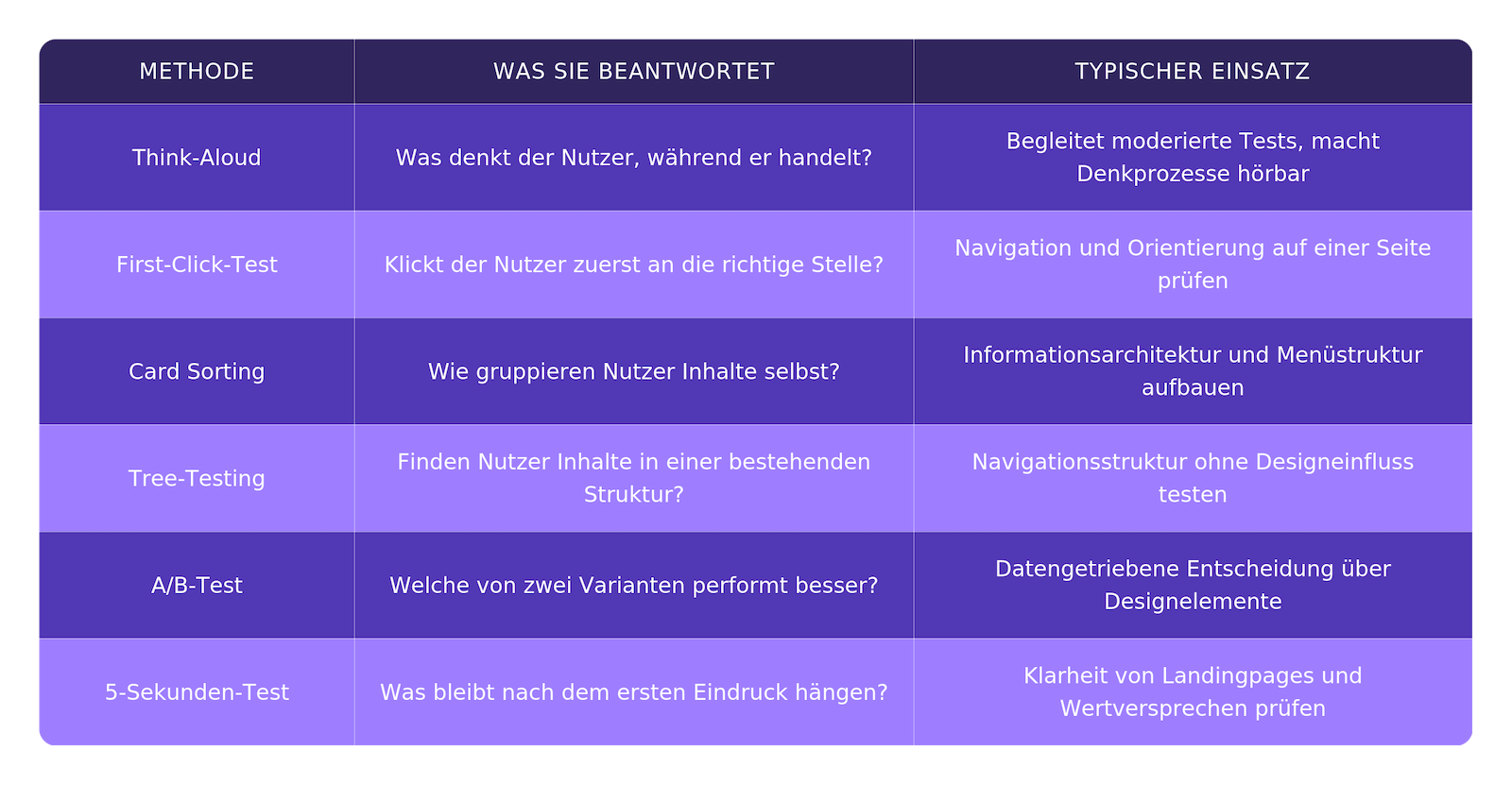
An important distinction: The heuristic evaluation or an expert review is not considered a user test. In this, an expert evaluates the interface against recognized usability principles, but without involving actual users. This is a useful, quick method, but it doesn't replace a test with your target audience. We delve deeper into when each approach is worthwhile in our article on UX Audit vs. Usability Test.
Moderated vs. Unmoderated: When to Use Which?
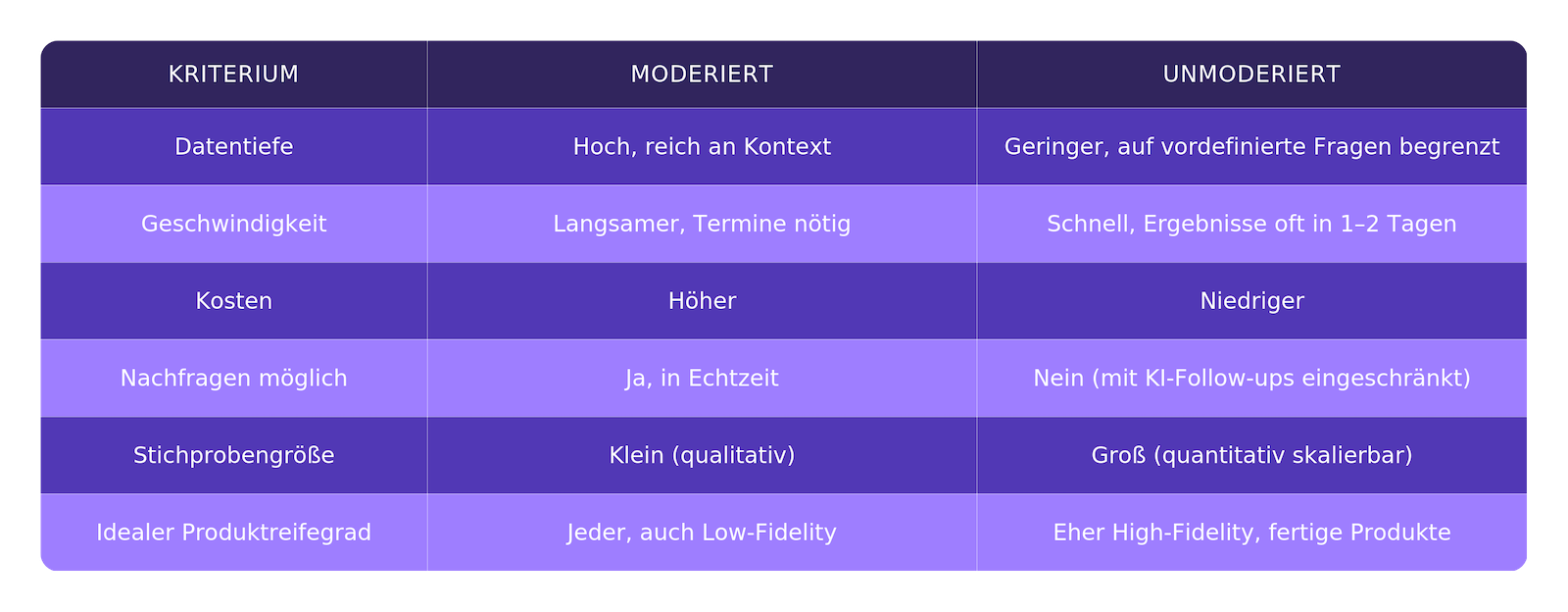
Moderated provides depth and allows for follow-up questions, while unmoderated offers scalability, speed, and lower costs. This is the core distinction, to which the difference can essentially be reduced.
In a moderated test, a UX researcher guides the participant through tasks, observes in real-time, and asks follow-up questions when something interesting arises. This yields richer qualitative data and reveals hesitation, frustration, or detours that would be lost in raw numbers. The price for this? Higher costs, slower pace, and the effort of scheduling. Moderated tests are well-suited for prototypes of any maturity level and for products that require explanation. The decisive advantage becomes apparent precisely where expected behavior is unclear: A moderator can observe and ask clarifying questions or assist a less tech-savvy target audience in navigating the test, rather than letting them fail due to the methodology.
In an unmoderated test, participants work independently, the screen is recorded, and no one accompanies them. This allows for larger sample sizes, greater speed, and lower costs, but offers less depth and no opportunity for spontaneous follow-up questions. This variant is better suited for finished products and clearly defined questions. Unmoderated, remote tests are often used for high-fidelity prototypes. For example, in the final design phases when a production-ready, interactive app only needs last-minute adjustments before launch.
Experience in the DACH region has shown that moderated testing particularly shines with low-fidelity prototypes and the combination of test plus interview, as follow-up questions provide the greatest added value here. Unmoderated testing excels in terms of volume and rapid evaluation.
How many participants you actually need largely depends on whether you are testing qualitatively or quantitatively. Even with smaller groups, you can find problems, but for reliable numbers, larger groups are needed. We cover the specific numbers in detail in our article on how many test participants you need for usability testing.
Remote vs. Lab vs. Guerrilla
Lab testing isn't automatically "better." This is perhaps the most surprising finding of this section, and it's well-supported. In a widely cited analysis by MeasuringU, a lab test and an independent remote test were compared. The result: The SUS (System Usability Scale) scores after the tests were within 2% of each other, a surprisingly small and non-significant difference. What's remarkable is the sample size: the lab team tested only about 4% of the number of users compared to the remote team (approximately 12 versus over 300 users) and still arrived at practically the same overall assessment.
For an honest assessment, it's important to note: While both approaches were very close in terms of overall metrics (SUS score and overall task completion), there were indeed significant, sometimes statistically significant, deviations for individual tasks. The overarching conclusion for both teams was almost identical: Remote testing comes surprisingly close to a face-to-face test without exactly replicating it.
Here are the three options in plain terms:
Remote testing is conducted virtually via a tool or video call. It's cheaper, involves no travel or venue costs, offers a wider geographical reach, and users test in their familiar environment. Remote testing can be both moderated and unmoderated.
Lab or in-person testing means the moderator is physically present. This provides more observable signals like facial expressions and body language in a controlled environment – but it's expensive and logistically complex.
Guerrilla testing involves quick tests with random people, for example, in a café or a pedestrian zone. It provides a lot of qualitative material cheaply, but the method isn't suitable for in-depth analysis, follow-ups, or representative target groups.
In our experience, for most digital products: Remote testing today delivers equivalent insights at significantly lower costs. Lab testing is worthwhile where it truly matters; with sensitive target groups, for products that require extensive explanation, or when the physical context of use plays a role, such as with an operating terminal in an industrial plant.
Qualitative vs. Quantitative: What You Really Want to Measure
Qualitative research identifies problems, quantitative research proves them with numbers. This functional distinction is the quickest way to differentiate between the two approaches.
Quantitative tests provide measurable data: Task Completion Rate, Time on Task, Error Rate. They help you identify patterns, set benchmarks, and statistically support decisions. These KPIs are only briefly mentioned here, while we delve deeper into them in the article on measuring usability and KPIs.
Qualitative tests are non-numerical. They reveal the 'why' behind behavior: motivation, emotion, thought processes. Why does someone abandon checkout? Why does someone overlook a crucial button? No spreadsheet in the world can answer these questions; only observing real people can.
The two approaches complement each other. The most effective tests combine both: a method that tool providers like Maze also recommend as standard: first moderated, interview-style questions, then unmoderated usability tests for the data, concluded by another round of moderated discussions. Build early exploratory understanding of behavior and pain points, then collect quantitative metrics and broader trends, and finally "Why?" delve deeper into the numbers.
AI-Moderated Tests: What Changed in 2026
AI shifts the classic trade-off between depth and scale. What used to be true – moderated for depth, unmoderated for volume – is softening because automated synthesis and context-based follow-up questions bring unmoderated tests closer to moderated quality.
Two developments are specifically driving this:
AI Synthesis. Automatic transcription, theme recognition, and highlight clips reduce analysis time from days to hours. Modern research platforms now offer AI-generated summaries, auto-transcripts, follow-up questions, key theme clustering, and automated interview moderation. For unmoderated studies, AI summaries and themes are available as soon as enough open-ended responses have been collected.
AI Follow-ups. In unmoderated tests, AI asks context-based follow-up questions – a gap that previously only a human moderator could fill. Maze describes this as a best-of-both-worlds approach: an open question with dynamic follow-ups in an unmoderated test to explore the tester's initial reaction, as one would in a moderated session. Practically, up to three additional follow-up questions can be generated based on each initial response to delve deeper into answers and uncover insights that would otherwise have remained hidden.
As useful as this is, there are clear limits. From an agency perspective, two cases remain where real people and trained moderation are indispensable: first-time user onboarding, where subtle reactions in the first few seconds matter, and subjective design quality – does the interface appear trustworthy, high-quality, reputable? Especially in FinTech or Healthcare, where trust determines adoption, no AI can replace the trained eye of a moderator.
The correct classification is therefore neither hype nor rejection. AI reduces routine work and expands the scope, but it does not replace thoughtful test design or neutral interpretation. We compare specific tools with their AI functions in the Tools article – here, the trend matters, not the individual product.
Decision Matrix: The Right Method by Goal, Budget, and Timeline
Research question first, then budget and timeline as filters. That's the entire logic. If you know what you want to answer, the method is usually already obvious.
In plain terms, summarized:
"Why do users fail at step X?" → moderated and qualitative.
"What percentage complete Task X?" → unmoderated and quantitative.
Low budget or time → unmoderated remote or guerrilla.
High validity and significant stakeholder involvement → moderated plus larger sample.
The following matrix translates this into the five most common scenarios we encounter in practice.

A few practical scenarios to bring these points to life:
Understanding checkout abandonment
Your analytics show that users abandon the payment page, but not why. A moderated remote test with 5–8 users, where you can ask questions in real-time, uncovers the friction that no funnel report can show.
Benchmark landing page conversion
You want to know which of two variants performs better in initial validation. An unmoderated remote test with a larger sample provides reliable data quickly and affordably.
Validate new dashboard
For a complex B2B tool, combine a moderated test with think-aloud to see where trained first-time users get stuck.
Once the method is established, it's time for implementation. If you don't want to handle the selection, setup, and execution internally, we'll take care of it completely for you: As a done-for-you usability testing service from Berlin we cover the entire process.
Common methodological errors that make tests worthless
The most expensive mistake is using the wrong method for the goal. You quantitatively measure success rates, even though you actually want to understand why users fail.
Or you conduct deep qualitative interviews, even though you only need a hard number for stakeholders. The counter-approach is simple: Formulate the question first, then the method will emerge.
The other common errors, each with a practical remedy:
Suggestive setup and leading questions
Whoever asks „How easy was that?", gets sugar-coated answers. Remain neutral and let the user work without guiding them.
Too few or unsuitable participants
Five people from the wrong target group are useless. Define screening criteria before recruiting.
Using only one method instead of a combination
Qualitative research without quantitative data misses the evidence; quantitative data without qualitative insights misses the 'why'. Combine both when the decision is critical.
Lack of a clear research question upfront
Without a clear question, there's no benchmark for success. Write down that one question before you set up anything.
Conclusion and next steps
The right method always stems from the research question. If you formulate it clearly, you've almost already chosen the method. The rest is a matter of budget and timeline, not methodology.
Your next step is clear: Note down your one, precise question. Run it through the decision matrix above. Start with the method in the corresponding row. That's all you need to get started.
And if you'd prefer to have it implemented professionally right away, book a free consultation with us.